


Watercolor Brush Strokes and Stains

Infuse Artistry into Your Designs with Watercolor Brush Strokes and Stains
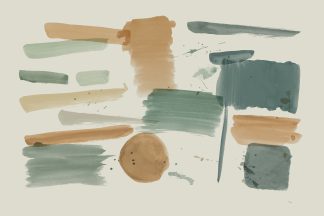
Bring a vibrant, artistic touch to your designs with our pack of Watercolor Brush Strokes and Stains. Perfect for illustrators, designers, and artists looking to add a splash of creativity to their work, this pack allows you to seamlessly integrate watercolor effects into your projects. Whether creating posters, digital art, or book covers, these elements are designed to enhance your designs with ease, compatible with Adobe Photoshop, Affinity Designer, and Procreate.
Unique Features for Enhanced Creativity
- Color Editable: Each brush stroke and stain is fully color editable, enabling you to tailor the hues to fit your design palette and artistic vision. Adjust the intensity to ensure each element blends smoothly into your projects.
General Features for Comprehensive Design Flexibility
- Isolated Items: All elements are isolated, making them easy to move, scale, and rotate, allowing for perfect placement within any layout.
- Adjustable Shadows: Shadows can be turned on or off to help set the mood or highlight specific features of your design, providing added depth and texture.
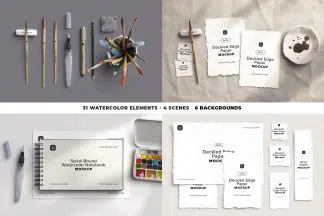
- High-Quality Elements: Includes realistic, photograph-based mockups that bring an authentic watercolor feel to your digital artwork.
- Changeable Background: The background color can be customized to complement or contrast with your designs, ensuring your artwork always stands out.
- Orientation Flexibility: The elements work well in any orientation, whether vertically or horizontally, accommodating a variety of creative projects.
Compatibility and Included Files
Designed for seamless integration with major design platforms, the downloadable package includes:
- Layered PSD for Photoshop
- Layered File for Affinity Designer
- Item Scene Creator for Procreate
- PNG Files with Transparent Background
All files are meticulously organized, labeled, and named to ensure an efficient and intuitive design process, enhancing your creative workflow.
With the Watercolor Brush Strokes and Stains pack, transform your digital canvas into a vibrant display of watercolor art. Ideal for those seeking to incorporate watercolor elements and artistic elements into their designs, this pack is essential for achieving dynamic, eye-catching results that resonate with audiences. Let your creativity flow and paint your projects with strokes of genius!
- Nº of Items 13
- Dimensions 6000 × 4000 px
- DPI 300
- File Size 209.3 MB
- File Type .afdesign .png .procreate .psd
Product Specs
How to Use
Additional Information
- Download Files 4 files
- Collections Watercolor
More from Watercolor



Complete Your Project





1 review for Watercolor Brush Strokes and Stains
You must be logged in to post a review.
JessicaAmber (verified owner) –
The PSD comes as a single image with all the brush strokes on their own layers. There are 13 brush strokes in total. The one in the top left of the preview, Watercolor Paint Stain #4 (c), measures 2664 x 1074px. The smallest stroke, in the middle of the preview, measures 1214 x 324px.
The color overlay effect suits both vibrant and muted colors. You can also duplicate the stroke item to make the paint more dark and opaque.
If I was gonna have any critique, it would be just wanting separate PSDs for each paint stroke, so it’s easier to Place the stroke into a existing design.